 By
By 
If you’ve ever researched popular ways to make money online, you’ve probably come across user testing jobs. Many platforms pay you to test websites and apps and share your feedback. Well-known examples include UserTesting, PlaytestCloud, and TestingTime.
But one thing is always true: no single website has enough tests for everyone. That’s why it’s smart to sign up for multiple platforms to maximize your chances of earning.
Today, we’re taking a closer look at another well-known usability testing website that pays users for quick design-related tasks: UserCrowd.
This platform works a little differently from traditional user testing websites. Instead of checking functionality or finding bugs, UserCrowd pays you to give fast design feedback—on logos, layouts, colors, UI preferences, and more.
Below is a detailed breakdown of how the site works, what you can earn, and whether UserCrowd is worth your time.
What Is UserCrowd?
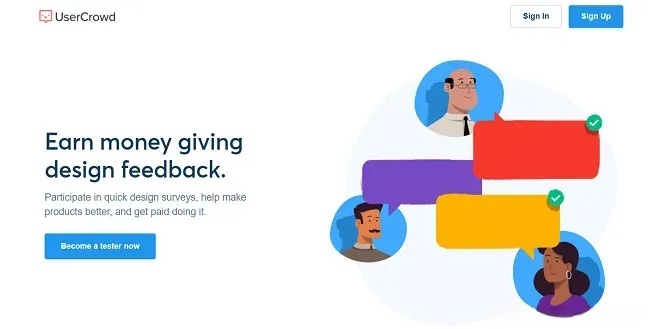
UserCrowd—formerly known as UsabilityHub—is a tester panel where you can get paid for giving design feedback on websites, logos, graphics, and user interfaces.
Most user testing jobs involve QA-style tasks: testing a website or app, following instructions, speaking aloud, and recording your screen.
UserCrowd is different. Instead of testing functionality, you simply answer quick questions about design preferences.
As a UserCrowd tester, you may:
*Pick which logo looks better
*Choose a color scheme you prefer
*Select a cleaner webpage layout
*Evaluate navigation or UI elements
UserCrowd’s tasks are shorter than typical tests, and you don’t need a microphone or webcam. Payments are lower, but the tasks are extremely quick.
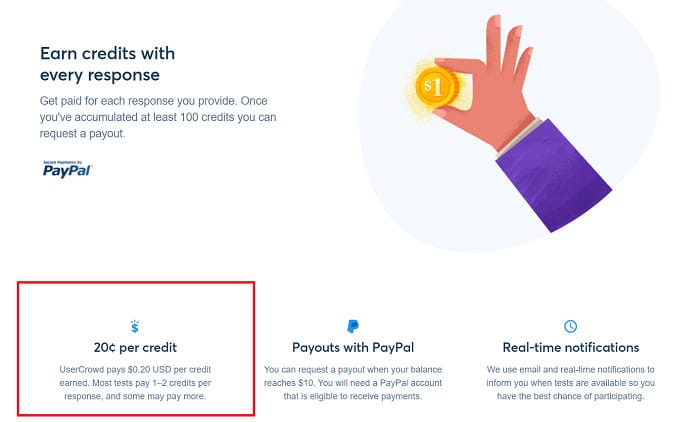
Most tasks pay $0.20 to $1, based on how many “credits” you earn.

How UserCrowd Works
Signing up for UserCrowd is completely free. You must be:
At least 18 years old
Living in a PayPal-supported country
Registration takes less than a minute. Earning with UserCrowd follows five basic steps:
(1)Sign up
(2)Complete your tester profile
(3)Set up notification preferences
(4)Take tests and earn credits
(5)Cash out once you reach $10
Let’s break down each step in detail.
- Create Your UserCrowd Account
Signing up only requires your name, email, and a password. You cannot use Google or Facebook to join, which is not a big issue.
Before you can start, you must accept UserCrowd’s tester agreement, which states that you will:
*Do your best on each test
*Be honest
*Not create multiple accounts
*Not copy or share test content
Once you accept the rules, your account is ready.
- Complete Your UserCrowd Profile
Just like on survey and testing sites, you need to fill out a short demographic questionnaire before receiving tests. This helps UserCrowd match you with relevant tasks.
You’ll answer questions about:
*Country of residence
*Languages
*Birth year
*Gender
*Education level
*Job status and household income
This process takes only 1–2 minutes.
You must also verify your phone number via SMS before taking tests.
- Set Your Notification Preferences
One great thing about UserCrowd is the flexibility in how you receive test alerts. Like most platforms, they email you when a new test is available.
But you can also enable push notifications and choose specific days and times to receive alerts.
Tests are first-come, first-served, so getting notifications instantly helps you earn more.
- Take Tests and Earn Credits
Once your profile is approved, you can browse available tests on your dashboard.
However, be prepared: you might not see any tests at first. When I signed up, my dashboard was empty for the first few weeks until I finally received my first email invitation. This is normal and a common complaint from testers.
Your dashboard shows:
*Your balance
*Number of tests completed
*Your tester rating
Your rating starts at 100%. If your feedback is unhelpful or too vague, UserCrowd may reduce your rating.
To maintain a high score:
*Be honest
*Give constructive, specific feedback
*Avoid unhelpful comments like “This looks ugly”
Instead, say things like:
*“The logo looks unbalanced.”
*“The navigation menu feels unclear.”
Most tests pay 1–2 credits, and 1 credit = $0.20. So a single task pays about $0.20–$0.40, and tasks are extremely fast.
After completing a test, your earnings are added to your balance instantly.
- Cash Out
*Once you reach $10, you can cash out to PayPal for free.
*UserCrowd does not offer:
Bank transfers
Gift cards
Because tests pay only $0.20–$0.40, reaching $10 takes time—even though most tasks take just seconds to complete.
Types of Tests on UserCrowd
UserCrowd offers three main types of tasks:
- Card Sorting
You’ll see a list of items and drag them into categories. Tasks may involve 10–40 cards.
- Preference Tests
You choose between visual options—colors, fonts, layouts, etc. Sometimes you’ll be asked to explain your choice in a sentence or two.
- Navigation Tests
You click through a website and show where you’d expect to find certain information.
Occasionally you’ll find other unique question formats, but most tasks are extremely short.
Many tests contain only one question.
Some testers report:
“I did 55 tests to reach $10.50 and cash out.”
That sounds like a lot, but most tests take under 10 seconds.
Tips to Earn More with UserCrowd
Many testers find UserCrowd slow, so here are proven strategies to increase income:
*Keep the UserCrowd tab open
*Enable email + push notifications
*Accept tests immediately—they fill up fast
*Give helpful, detailed feedback to maintain a high rating
*Combine UserCrowd with other testing sites
One user mentioned that simply using notifications boosted their earnings from $2 per month to around $10.
Some testers complete 3–10 tests per day, depending on how often they check their devices.
How Much Can You Earn?
UserCrowd’s earning potential is very low.
Some months you may earn:
*$0
*$5
*$10–$20 if you’re lucky
Most testers do not receive consistent opportunities.
The key to maximizing income is to use multiple testing platforms.
What Other Users Say
User reviews of UserCrowd are mixed:
Positive
*Some testers report earning $30–$50 over a few months
*Feedback tasks are quick
*Cashouts are reliable
Negative
*Many users receive few or no tests
*Earnings grow very slowly
*UserTesting and other sites pay much more
The inconsistency comes from demographic targeting—if you don’t match what clients need, you simply won’t get tests.
Is UserCrowd Legit?
Yes—UserCrowd is a legitimate platform, and there are payment proofs online. However, the earning potential is extremely low and test availability is not guaranteed.
The $10 minimum payout means some users may have money sitting in their account for months.
It’s not a scam, but it is a very small side hustle with limited income opportunities.
Pros & Cons
Pros
✔ Free to join
✔ Available worldwide
✔ Pays real PayPal cash
✔ Extremely fast tests
✔ Helpful notification system
Cons
✘ Very low earning potential
✘ Many users receive zero tests
✘ No direct deposit option
✘ No referral bonuses
✘ $10 cashout minimum takes time
Ultimately, UserCrowd is best used as an extra platform—not your main source of online income.
Best UserCrowd Alternatives
If you enjoy giving feedback online, here are better-paying alternatives:
*UserTesting
*TryMyUI
*Userlytics
*PlaytestCloud
*WhatUsersDo
*UserPeek
*Appen
These platforms won’t make you rich either, but they offer significantly more earning potential.
Who Should Use UserCrowd?
*UserCrowd is ideal if you:
*Already use other testing sites
*Want quick, frictionless tasks
*Enjoy design-related feedback
*Want to diversify your earning sources
It’s not suitable if you want to earn hundreds of dollars per month. The income is too unstable and too low.
Common FAQs
Is UserCrowd safe?
Yes. You only provide your email and PayPal email plus a phone number for SMS verification. No sensitive information or downloads required.
How much can you earn?
Most tests pay $0.20–$1, depending on how many you qualify for.
Who can join?
Anyone aged 18+ living in a PayPal-supported country with a working phone number.
Final Verdict
UserCrowd is a legitimate user testing platform, but its earning potential is extremely limited. It’s easy to sign up and the tasks are very quick, but most users won’t receive enough tests to earn consistent income.
If you decide to join, treat it as a tiny side hustle and combine it with other platforms to maximize your earnings.